| Welcome, Guest |
You have to register before you can post on our site.
|
| Forum Statistics |
» Members: 2,689
» Latest member: mazacks
» Forum threads: 2,065
» Forum posts: 20,554
Full Statistics
|
| Online Users |
There are currently 457 online users.
» 3 Member(s) | 449 Guest(s)
Applebot, Baidu, Bing, Google, UptimeRobot, patrickdrd, S8F8ry
|
| Latest Threads |
Как вернуть все настройки
Forum: Русский Форум
Last Post: S8F8ry
1 minute ago
» Replies: 9
» Views: 3,064
|
Stable version (5.3.1184....
Forum: Release Channel
Last Post: dopeymope
7 hours ago
» Replies: 120
» Views: 52,869
|
[bug] Cent Browser 5.3.11...
Forum: Bugs & Suggestions
Last Post: Dmitresso
10-29-2026, 05:23 PM
» Replies: 2
» Views: 204
|
"Replace with current URL...
Forum: Bugs & Suggestions
Last Post: rey
10-29-2026, 11:24 AM
» Replies: 2
» Views: 206
|
Eye protection mode is bu...
Forum: Bugs & Suggestions
Last Post: rey
10-26-2026, 11:36 AM
» Replies: 5
» Views: 896
|
Translate English into Po...
Forum: Polskie Forum
Last Post: mlkdom
10-25-2026, 12:29 PM
» Replies: 107
» Views: 380,319
|
Did Cent devs ever heard ...
Forum: Chitchat
Last Post: rey
10-23-2026, 12:25 AM
» Replies: 0
» Views: 305
|
Dark Chrome Web Store wit...
Forum: Tips & Tricks
Last Post: papadoc
10-22-2026, 04:07 PM
» Replies: 3
» Views: 964
|
[function request] unload...
Forum: Bugs & Suggestions
Last Post: QZMTCH
10-21-2026, 05:21 PM
» Replies: 3
» Views: 821
|
Is it possible to delete ...
Forum: General Discuss
Last Post: rey
10-21-2026, 01:24 PM
» Replies: 3
» Views: 2,685
|
|
|
| What some Tab Grouping commands do?! |
|
Posted by: rey - 02-28-2026, 08:25 AM - Forum: Tips & Tricks
- Replies (3)
|
 |
Can somebody please explain to me what some Tab Grouping features do?
So here i created a group, right clicked it and there is a toggle Save Group = what it actually does? I see it adds launch icon to tab bar - so it's actually bookmark = then why call it Save?
At the same time, if i right click on that group icon in tab bar there is UnPin command that erases icon from tab bar, BUT when i click on group in tab bar - Save Group is still toggled On... Feels like strange contradiction.
There is another menu item - Hide Group, which results in group disappearing from tab bar = so it's actually Close group = why call it Hide?
When i click group icon in bookmarks bar(created above) it launches whole group loading all tabs.(Which is inconvenient) I enabled Lazy tabs loading, but that changed nothing, whole group is still loaded at the same time. Is there a way to open a group but only one tab loaded?
So far i found only way to open one link from group in a separate(non-grouped tab)
Initially i thought groups are usefull to say have all tabs of same domain "visually distinct", or to make "same thematic" pages be gropped for easier bookmarking, but since group is loaded at once it brakes the reason to use groups for that. So what are they for?
|

|
|
| Clean Cache |
|
Posted by: bomz - 02-14-2026, 01:09 AM - Forum: Bugs & Suggestions
- Replies (10)
|
|
I noticed the empty space on my system drive disappearing and discovered a folder that isn't cleared when I clear the cache.
USER\AppData\Local\CentBrowser\User Data\component_crx_cache
deleting all files from this directory does not lead to any fatal consequences
There's no similar folder in Google Chrome. The folder's size
USER\AppData\Local\Google\Chrome\User Data
isn't growing uncontrollably. I add folder component_crx_cache to CCleaner.
Please, add the folder to Disk Cleanup in browser, is it possible.
P.S. Most likely, the folder size increased dramatically after experimenting with subtitles.
Quote:The component_crx_cache folder in Chromium-based browsers (Edge, Brave, Chrome) stores cached extension and component files, often causing large file size issues, failed profile syncs, and HTTP 413 errors in virtualized environments. It is safe to delete, though it will likely regenerate. Excluding %localappdata%\Microsoft\Edge\User Data\component_crx_cache from syncing resolves these issues.
|
|
|
|
| Cent Browser = the only truly portable Chromium browser |
|
Posted by: ZenBeer - 02-02-2026, 04:34 PM - Forum: General Discuss
- Replies (3)
|
|
I just downloaded the latest portable 5.2.1168.83 to my Windows 10 PC. Installed Ublock Origin + several other of my favorite extensions. Created a few bookmarks. Copied it to USB thumb drive, copied it to my Windows 7 laptop, all extensions and bookmarks all present.
No other Chrome browser does this, even those that claim to be portable (the browsers are portable but extensions have to be re-installed on every machine and bookmarks don't get copied so not really portable). This is the main reason I prefer Mozilla over Chromium for portable browsers.
Keep up the good work and please maintain support for Manifest v2 so Ublock Origin, best adblocker available continues to function.
All other Chromium browser are Manifest v3 so no Ublock Origin, only crippled Ublock lite.
|
|
|
|
| Resource leak with the "Browser" task |
|
Posted by: tanquang - 01-21-2026, 03:27 AM - Forum: Bugs & Suggestions
- Replies (4)
|
 |
I always use incognito mode, but after updating to v5.2.1168.83, I discovered that the "Browser" task (apparently) wasn't garbage collecting, leading to a very rapid increase in the memory footprint. When the memory footprint exceeded 200,000K+, every time I opened a new tab (both the new tab and the webpage), it would lag for a few seconds, and CPU usage would increase by 100+.
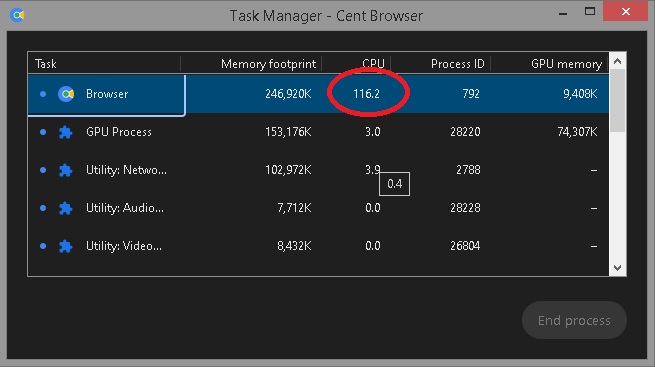
Even after I tried killing all tabs, the memory footprint of the "Browser" task continued to grow (though it slowed down), and the CPU usage remained consistently between 1 and 10+.
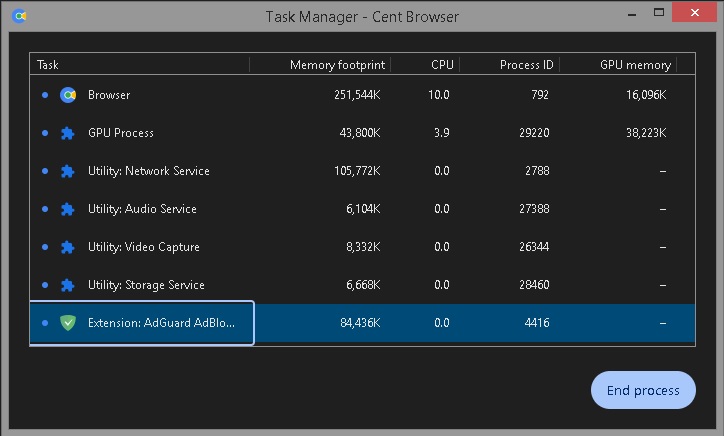
I've identified several (possible) causes:
1. Blob storage isn't garbage collected:
When checking chrome://blob-internals/, I found many blobs listed there, some with very large lengths (see attached image below). With the increasing memory footprint of the "Browser" task, more blobs are being created here.
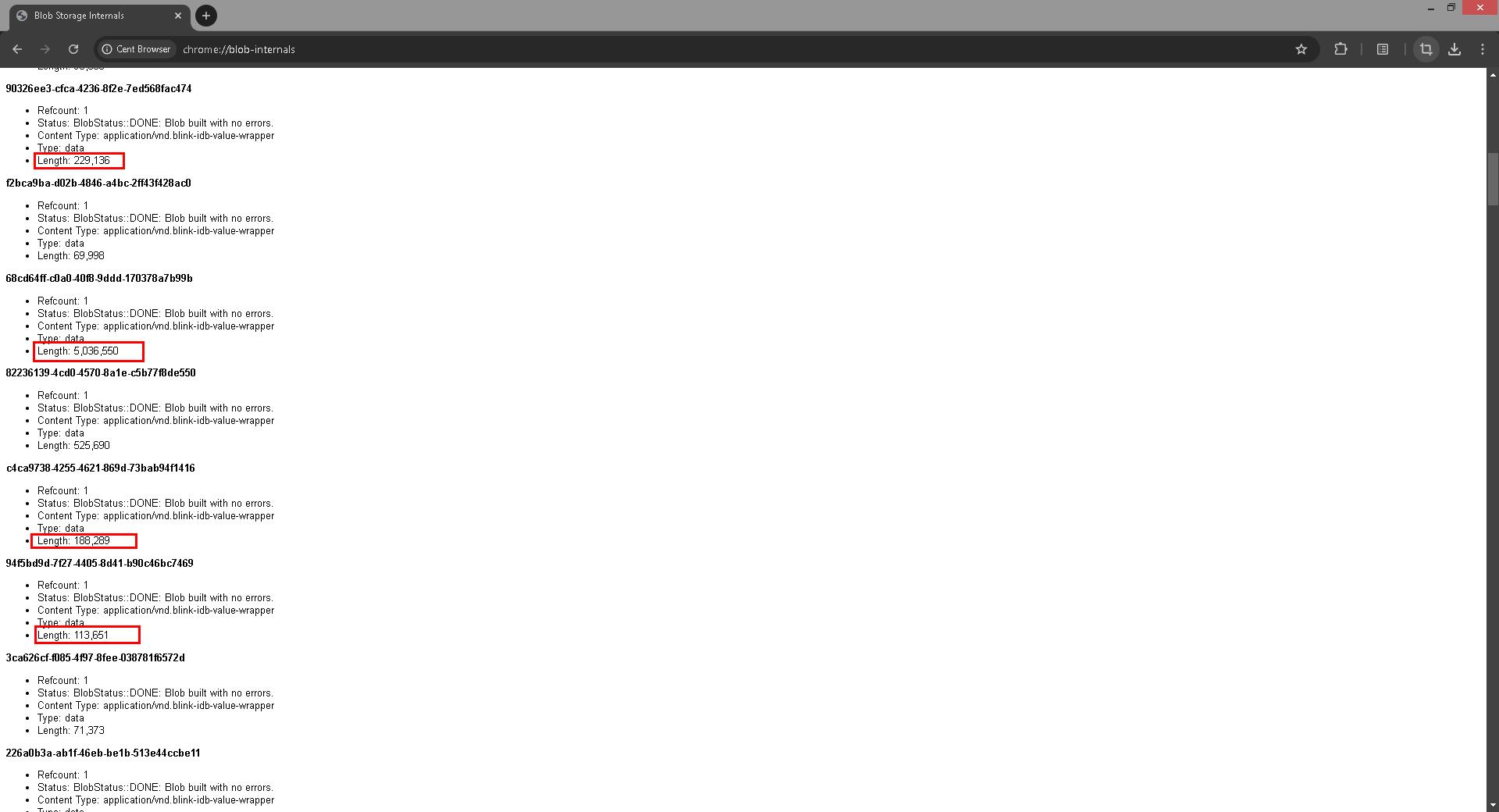
Because it's incognito mode, the "Delete browsing data" feature is completely useless. Even when opening a regular tab and checking chrome://blob-internals/, I see many other blobs there, even though I'm not browsing with a regular tab.
2. Affected by other Chromium-based browsers:
After opening CentBrowser, every time I open other Chromium-based browsers or Chromium Embedded Framework (CEF) Client Applications, the memory footprint of the "Browser" task increases rapidly, by about 30,000K each time if the current "Browser" task's memory footprint is below 200,000K, and gradually decreases if it's already above 200,000K. It seems there's a cross-memory leak here?!
|
|
|
|
|



![[Image: 2026-02-01-104402.png]](https://i.ibb.co/R4NZt4fr/2026-02-01-104402.png)
